Create AR Experiences
Instantly
Attach a video to any photo and ScanStory gives you a QR code. Whoever scans it points their camera at the printed image — and your video plays on top of it, in their browser. A no-code WebAR platform for photo-to-video AR.
Three steps. One QR code.
You do the first two once. The third happens every time someone scans, on any modern phone, with nothing to download.
-
Upload your image and video
Pick the printed photo, card, page or label people will point a camera at, and the video you want it to play. ScanStory learns to recognise that image.
-
Get your QR code
You get a QR code and a share link for the same experience. Print the code, put it on packaging, or send the link — both point at the same place.
-
They scan, the video plays
Your audience scans, points their camera at the image, and the video appears on top of it in their mobile browser. No app, no account, no headset.
Replace the video later and the QR code keeps working. The printed code you handed out never has to be reprinted.
Create WebAR Experiences
from Photos and Videos
ScanStory is a WebAR platform and AR experience platform in India that lets you attach a video to any photo or printed image. Upload your image and video, generate a QR scan code, and anyone who scans it will see the video overlay appear directly on top of the image — no app download required.
Perfect for business cards, wedding albums, product packaging, educational materials, event invitations, and anywhere you want print media to come alive with augmented reality.
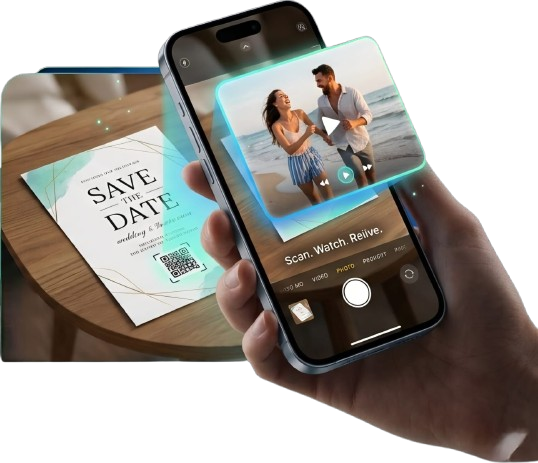
QR Code Based AR Scanner for Print and Digital Media
ScanStory's image recognition AR scanner detects your uploaded photo and instantly overlays the linked video — powered by WebAR, no app required.
Image-to-Video AR Experience
Upload any photo and attach a video to it. When someone scans your image with their phone, the video overlays directly on top — a true image-to-video augmented reality experience.
QR Code AR Scanner
No app download required. Scan the generated QR code, point your camera at the target image, and the AR video starts automatically in your mobile browser using WebAR technology.
AR Business Cards and Printed Media
Transform ordinary business cards, brochures, product packaging, and event invitations into interactive AR experiences that engage your audience every time they scan.
WebAR for Education
Bring textbooks, learning cards, and educational posters to life with AR video overlays. Students scan the image and see the lesson play — no headset, no app, just a phone camera.
No-Code AR Platform
ScanStory helps creators, educators, businesses, print shops, and agencies create AR experiences online without coding. Upload your photo and video, generate an AR QR code, and launch browser-based augmented reality experiences in minutes.
Augmented Reality Use cases for
One WebAR platform. Unlimited use cases. Watch how each industry brings print to life with AR.
Built for Everyone
Turn any printed material into an immersive AR experience










Education
Bring textbooks and learning materials alive with interactive AR lessons.
How ScanStory
AR Scanner Works
ScanStory's WebAR platform makes creating augmented reality experiences simple. Upload your image and video, generate a QR scan code, and anyone can instantly experience AR — directly from their mobile browser.
Choose Your Plan
Start free. Scale as you grow. Cancel anytime.
Free Trial
No credit card required
- Plan benefits included
PRO
12 project plan
- 12 projects
- 3 Pairs per project
- 200 scan limit allowed
Free Trial
No credit card required
- Plan benefits included
All plans include instant scan codes, view insights, and 24/7
support.
Need a custom plan? Contact
us

NEED A CUSTOM PLAN?
For custom plans, bulk orders, or enterprise solutions — contact us directly
Frequently Asked Questions
Everything you need to know about ScanStory's WebAR platform.
Your Print.
Now Alive.
Start creating WebAR experiences today with ScanStory, a no-code AR platform for browser-based augmented reality in India. No app, no coding, no complexity — just upload, generate an AR QR code, and share.